<!DOCTYPE html>
<html>
<title>W3.CSS</title>
<meta name="viewport" content="width=device-width, initial-scale=1">
<link rel="stylesheet" href="https://www.w3schools.com/w3css/4/w3.css">
<body>

<div class="w3-container">
  <h2>Active Tabs</h2>
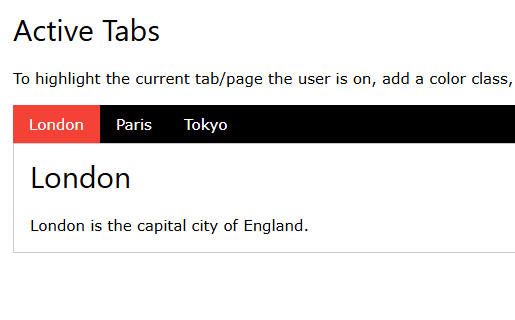
  <p>To highlight the current tab/page the user is on, add a color class, and use JavaScript to update the active link.</p>

  <div class="w3-bar w3-black">
    <button class="w3-bar-item w3-button tablink w3-red" onclick="openCity(event,'London')">London</button>
    <button class="w3-bar-item w3-button tablink" onclick="openCity(event,'Paris')">Paris</button>
    <button class="w3-bar-item w3-button tablink" onclick="openCity(event,'Tokyo')">Tokyo</button>
  </div>

  <div id="London" class="w3-container w3-border city">
    <h2>London</h2>
    <p>London is the capital city of England.</p>
  </div>

  <div id="Paris" class="w3-container w3-border city" style="display:none">
    <h2>Paris</h2>
    <p>Paris is the capital of France.</p>
  </div>

  <div id="Tokyo" class="w3-container w3-border city" style="display:none">
    <h2>Tokyo</h2>
    <p>Tokyo is the capital of Japan.</p>
  </div>
</div>

<script>
function openCity(evt, cityName) {
  var i, x, tablinks;
  x = document.getElementsByClassName("city");
  for (i = 0; i < x.length; i++) {
    x[i].style.display = "none";
  }
  tablinks = document.getElementsByClassName("tablink");
  for (i = 0; i < x.length; i++) {
    tablinks[i].className = tablinks[i].className.replace(" w3-red", "");
  }
  document.getElementById(cityName).style.display = "block";
  evt.currentTarget.className += " w3-red";
}
</script>

</body>
</html>
 LinkedIn Account
 GitHub Account
 Leetcode Account
 GeeksforGeeks Account